
 English
  Español

Tips for More Effective Studying
Nihongo Online School > Tips for More Effective Studying > The Apps That Helped Me Pass JLPT N5
The Apps That Helped Me Pass JLPT N5

2026/06/13

Director: Kotaro Muramoto
Principal of Nihongo Online School
In September 2019, he founded "Nihongo Online School". Since then, has been teaching Japanese online lessons, with a total of over 1,000 students.
He has designed an individualized curriculum based on student’s needs and study goal. And is conscious of making the classes speech-centered in order to improve students’ speaking skills.
The school asks students to submit homework assignments worth 2 hours per lesson to improve faster. By supporting students with these features, students are able to efficiently improve Japanese language skills.
Contents

The First Step: Preparing Your Digital Environment for the JLPT N5
When I decided I wanted to certify my Japanese level and aim for the JLPT N5, I quickly realized that motivation alone wasn’t going to be enough. I needed a system. At first, the amount of information, syllabaries, and kanji seems like an impossible mountain to climb. However, the secret isn’t studying 10 hours straight on a Sunday, but turning Japanese into a natural part of your daily digital ecosystem. Before downloading dozens of heavy applications that will only take up space on your phone, it is essential to prepare the ground. For me, this meant changing the way I interacted with my devices and establishing a study routine that adapted to my true way of learning, moving away from conventional methods that simply didn’t click with my brain.
Setting up the Japanese flick keyboard
If there’s one golden piece of advice I can give you before you start with any app, it’s this: delete the romaji keyboard and install the Japanese flick keyboard (kana flick keyboard) on your mobile. At first, it will be hard to type, but forcing your brain to think directly in hiragana and katakana instead of our alphabet is the most important step to taking off.
Duolingo for cementing the basics
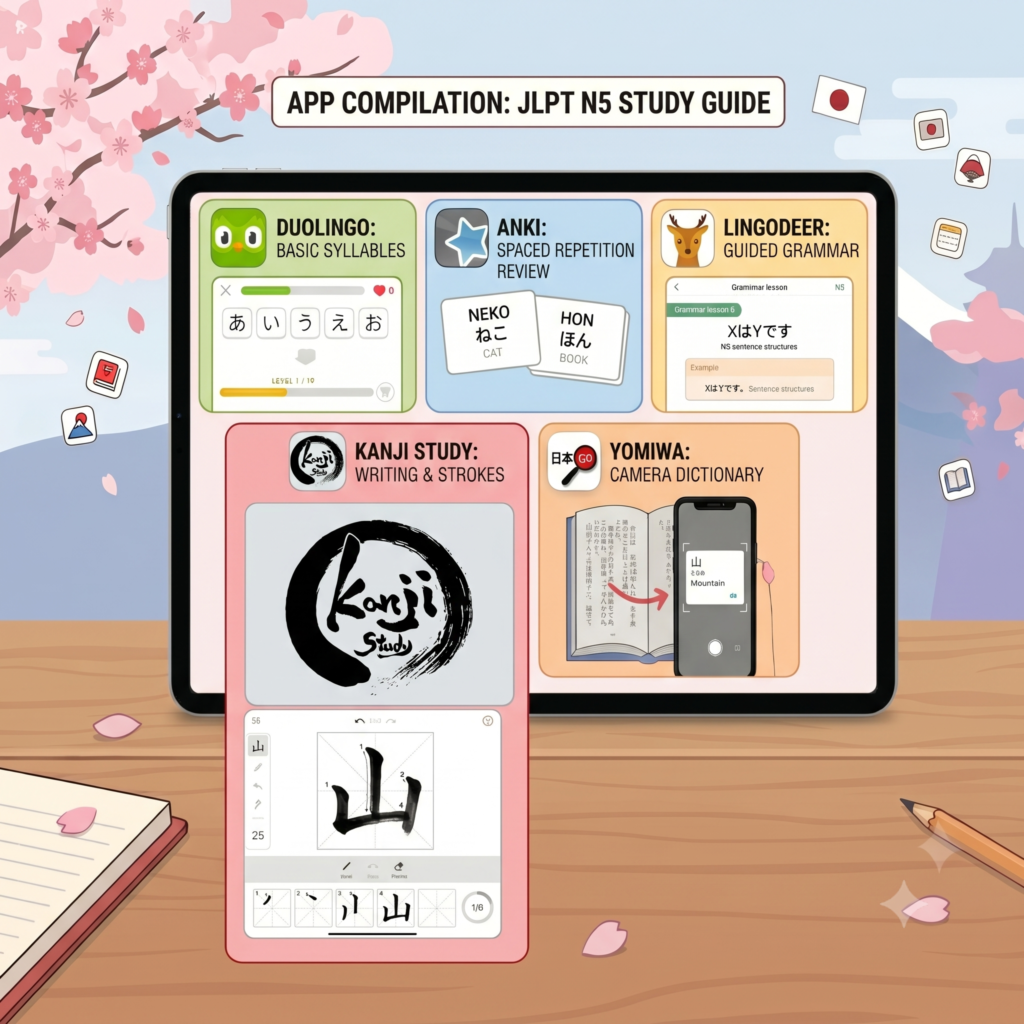
We all know the famous green owl, and while it won’t magically lead you to fluency, it is a fantastic tool for the very first steps. I used it strictly to memorize hiragana and katakana, and to get my ear accustomed to the basic sounds of the language through constant and friendly repetition.
My method: Google Keep and physical notebooks
I soon discovered that reading and rereading flashcards didn’t work for me. My brain needs action. My main study method became writing compulsively. I used Google Keep Notes on my tablet and physical notebooks to trace the characters over and over again. Writing by hand, or with a stylus, solidifies the muscle memory of the strokes much better than just staring at a screen.
The trap of passive reading
Many students get frustrated because they feel they aren’t retaining the information. If you’re like me, passive reading goes in one ear and out the other. Accept your learning style from day one: if you need to repeat, scribble on sheets of paper, and fill up notepads for a concept to stick in your head, embrace that method without hesitation.
Pocket Dictionaries: Your Best Daily Allies
As you move beyond hiragana and start facing real vocabulary and the dreaded kanji, a good dictionary becomes more indispensable than any textbook. During my N5 preparation, I realized I needed fast, accurate tools that didn’t always rely on an internet connection. It’s not just about looking up the meaning of a word, but understanding its context, its stroke order, and how it fits into a sentence. The right dictionaries act like private tutors that fit in your pocket, ready to solve any doubt on public transport, in the supermarket line, or in the middle of an intense study session with your notes.
Takoboto: The offline lifesaver
Takoboto is, without exaggeration, one of the most useful apps I had installed. It is an incredibly comprehensive and fast offline dictionary. I used it constantly to look up words on the go, check pronunciation, and see example sentences that helped me understand vocabulary in context.
Yomiwa: Instant visual translation
When I came across a kanji I didn’t know how to read or write (which is a daily occurrence studying for the N5), Yomiwa was my solution. Its camera feature allows you to focus on any Japanese text and get the reading and meaning instantly. It is an absolute survival tool.
Here’s the trick: instead of downloading separate flashcard apps, I took advantage of built-in features. Both Yomiwa and Takoboto allow you to save the words you look up in custom lists. I used these internal spaced-repetition systems only as a secondary supplement to review what I had already searched for.
Why traditional Anki wasn’t for me
Although Anki is the “holy grail” for many Japanese learners, it simply didn’t work for me. The app itself is fantastic, but its format of “read, think, and flip the card” clashed with my need to actively repeat and write. Don’t feel bad if the most popular method doesn’t suit you; the important thing is finding what makes you progress.
Dedicated Apps for Grammar, Kanji, and Active Review
With the keyboard configured, syllabaries mastered, and dictionaries ready, it was time to structure the knowledge. The JLPT N5 requires you to master specific grammar rules and a set of roughly 100 kanji. For this, I needed apps that offered a guided curriculum and exercises that forced me to think. The key at this stage was to diversify: use one solid app for grammar structure, another robust and detailed one for the meticulous study of characters, and a couple of lighter options to keep the brain active on those days when sitting down to formally study felt like too heavy a task.
LingoDeer: Grammar step by step
If Duolingo is for the basics, LingoDeer is the real grammar teacher. It is specifically designed for Asian languages, and its grammar explanations are clear, concise, and perfect for the N5 level. It helped me understand the logic behind particles, which is usually the biggest headache at the beginning.
Kanji Study: The best investment
This application is a masterpiece for those who need to write to learn. Kanji Study allows you to break down kanji by JLPT level, see the correct stroke order, and, most importantly for me, it forces you to draw them on the screen to advance. It was the ultimate tool for my muscle memory.
Shinobi: Fun and agility on iOS
For iPhone users, Shinobi is an excellent option for reviewing vocabulary in a fast and visually appealing way. Its gamified design makes review sessions feel less like an exam and more like a personal challenge of mental agility.
Shima Bird: Casual and stress-free review
Sometimes you only have 5 spare minutes and don’t want to open a dense app. Shima Bird served me exactly for that. It’s a simple, colorful, and straightforward app that I used to keep concepts fresh through quick mini-games without the pressure of a full study session.
Gamifying Learning: When Studying is Playing
Finally, the secret ingredient to not abandoning Japanese study before reaching the N5 exam is fun. Learning such a complex language is mentally exhausting, and if it all comes down to vocabulary lists and grammar rules, the dreaded burnout will arrive quickly. As a video game lover, I discovered that integrating my passion for digital entertainment with my academic goal was not only possible but highly effective. Gamifying learning allows you to stay in contact with the language during your leisure hours, transforming rest time into passive flight hours that consolidate everything you’ve practiced in your notebooks and study apps.
The power of video games in learning
The brain retains information much better when it is associated with positive emotions or problem-solving in a safe environment. By using games designed to teach, the barrier of “I have to study” disappears, replaced by “I want to beat this level”.
Shashingo: Learning through photography
This game was an incredible discovery. Shashingo immerses you in vibrant Japanese streets where, equipped with a virtual camera, you take photos of the environment. Each photograph reveals the Japanese vocabulary of the captured objects, creating beautiful visual flashcards. It is an immersive and relaxing experience.
Your console as a classroom: Switch and Steam
Having Shashingo available on platforms like Nintendo Switch or Steam changes the rules of the game. Being able to take my learning to the Switch meant I could lie back on the couch after the gym or work and continue absorbing vocabulary naturally, integrating the language into the hardware I already used for fun.
One last tip for your N5
At the end of the day, tools are just vehicles. The apps and games I’ve mentioned were my bridge to the JLPT N5, but the engine was consistency and respect for my own way of learning. Download what catches your eye, delete what bores you, write until your fingers hurt if that’s what you need, and best of luck on your journey toward Japanese!